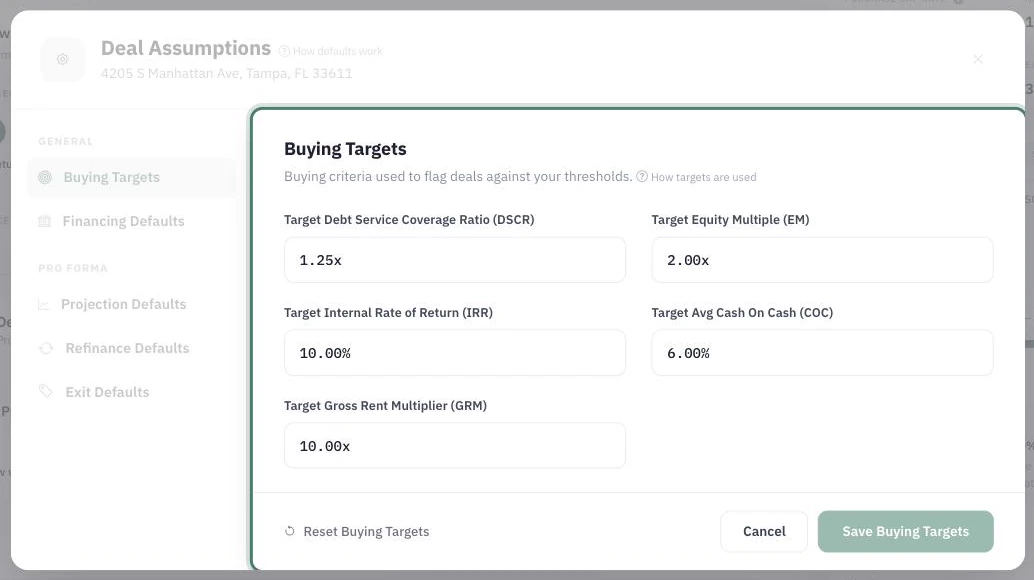
Buying Targets are your investment criteria, written down — the returns a deal must clear before it deserves your capital. Once set, DealWorthIt scores every analysis against them, so "good deal" stops being a feeling and becomes a test.
Where to set them
Buying Targets live in Deal Assumptions — one threshold per metric, and every deal is scored against them.
Open Deal Assumptions (also reachable from any deal via Edit targets) and choose the Buying Targets tab. You can set a target for:
Debt Service Coverage Ratio (DSCR) — how comfortably income covers the loan payment.
Equity Multiple (EM) — how many times the deal returns your money over the hold.
Internal Rate of Return (IRR) — the annualized return accounting for timing.
Avg Cash on Cash (COC) — what your invested cash earns per year, on average.
Gross Rent Multiplier (GRM) — price relative to gross rent; unlike the others, lower is better.
Choose the asset profile before editing targets. Save with Save Buying Targets. New deals capture these targets. When an editable deal is open, its asset and strategy are selected automatically. The Also apply these targets to this deal switch is off by default, keeping the deal’s targets frozen. Turn it on and choose Save and apply to update that deal and all its scenarios. If the defaults are already saved, the same button reads Apply to this deal. Reload the deal after applying to refresh its analysis. Other deals, financing, and projection assumptions stay unchanged. Use General defaults restores inheritance for the selected asset; it updates the current deal’s targets only when Apply is selected. Legacy Quick Analysis is excluded.
Where DealWorthIt uses them
"Against your targets" — every multifamily deal's Live Analysis scores the current scenario against each target, pass or miss, plus a DSCR gauge against your threshold.
Maximum Purchase Price — your targets are the constraints the price ceiling is solved against; no targets, no ceiling.
Price sensitivity — the price ladder marks which prices pass your targets and which fail, and names the failing criterion.
Scenario comparison and the dashboard — the same criteria thread through comparisons and pipeline signals, so every surface judges deals by the same yardstick.
Missing targets
A target you leave empty (or zero) is treated as not set: the deal simply isn't judged on that criterion, and features that need it — like Maximum Purchase Price — list it as unavailable rather than inventing a number. Set the targets that reflect how you evaluate deals, and leave the rest empty.
Choosing targets that mean something
DealWorthIt won't tell you what your IRR or DSCR target should be — that depends on your strategy, market, financing, and risk tolerance. What matters mechanically:
Make them yours. Copying someone else's thresholds means the pass/fail signals answer someone else's question.
Match the metric to the strategy. A cash-flow buyer leans on cash-on-cash and DSCR; a value-add seller cares more about IRR and equity multiple.
Don't over-constrain. Every added target narrows what can pass — and in Maximum Purchase Price, the strictest one becomes the binding constraint on price.
Revisit as conditions change. Targets set in one rate environment can quietly reject everything in another.
buying targetscriteriaDSCRIRRequity multiplecash on cashGRM